A deep dive into MVCC, heap pages, vacuum, and what to do when you have billions of rows to update.
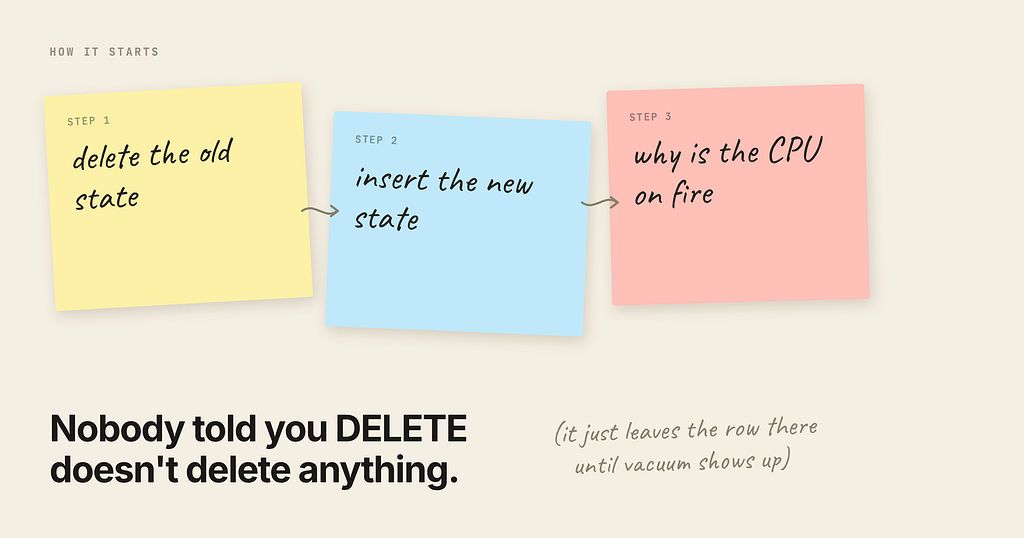
The symptom
You have a table that stores user state. Something happens — an event arrives — and your code does the obvious thing:
BEGIN;
DELETE FROM user_state WHERE user_id = $1;
INSERT INTO user_state (user_id, state, score, updated_at) VALUES ($1, $2, $3, now());
COMMIT;
It’s clean. It’s idempotent. It doesn’t require you to think about which columns changed. For a long time it works fine.
Then event volume grows, and PostgreSQL’s CPU starts climbing in a way that nothing in your query plans explains. Your queries are still index scans. Your pg_stat_statements top entries look reasonable. But CPU is pinned, replication lag creeps up, and every so often the whole database gets slow for a few minutes and then recovers on its own.
If you look at pg_stat_activity during one of those windows, you’ll usually find the culprit sitting right there:
autovacuum: VACUUM public.user_state
That’s the story. But “autovacuum is expensive” is not an explanation — it’s a restatement of the symptom. To actually fix this you need to understand what a DELETE followed by an INSERT does to the physical 8 KB pages on disk, and why that specific shape of write is close to the worst case for PostgreSQL’s storage engine.
Let’s go all the way down.
Part 1: PostgreSQL never modifies a row in place
This is the single fact that everything else follows from.
PostgreSQL implements MVCC (Multi-Version Concurrency Control) by keeping multiple physical versions of every row and letting each transaction see the version appropriate to its snapshot. There is no undo log (unlike Oracle or MySQL’s InnoDB, which keep old versions in a separate rollback segment). In PostgreSQL, old row versions live in the table itself, mixed in with the live ones.
Concretely:
- INSERT writes a new tuple and stamps it with xmin = the inserting transaction ID.
- DELETE does not remove anything. It stamps the existing tuple with xmax = the deleting transaction ID. The bytes stay exactly where they were.
- UPDATE is internally a DELETE + INSERT: it stamps xmax on the old tuple and writes a brand-new tuple somewhere.
So a “deleted” row is still fully present on disk, occupying its bytes, until some later process comes along and physically reclaims it. That process is vacuum.
Here’s this happening for real. A 100-row table, then delete 50 rows and insert 50 new ones:
CREATE EXTENSION pageinspect;
CREATE TABLE demo (id int PRIMARY KEY, state text);
INSERT INTO demo SELECT g, 'active' FROM generate_series(1,100) g;
-- delete half, re-insert half (the pattern from our app)
DELETE FROM demo WHERE id <= 50;
INSERT INTO demo SELECT g, 'active' FROM generate_series(1,50) g;
SELECT lp, lp_flags, lp_len, t_xmin, t_xmax
FROM heap_page_items(get_raw_page('demo', 0))
WHERE lp BETWEEN 48 AND 54;
 lp | lp_flags | lp_len | t_xmin | t_xmax
----+----------+--------+--------+--------
 48 |        1 |     35 |    801 |    802   <- deleted, still on the page
 49 |        1 |     35 |    801 |    802   <- deleted, still on the page
 50 |        1 |     35 |    801 |    802   <- deleted, still on the page
 51 |        1 |     35 |    801 |      0   <- live
 52 |        1 |     35 |    801 |      0   <- live
 53 |        1 |     35 |    801 |      0   <- live
 54 |        1 |     35 |    801 |      0   <- live
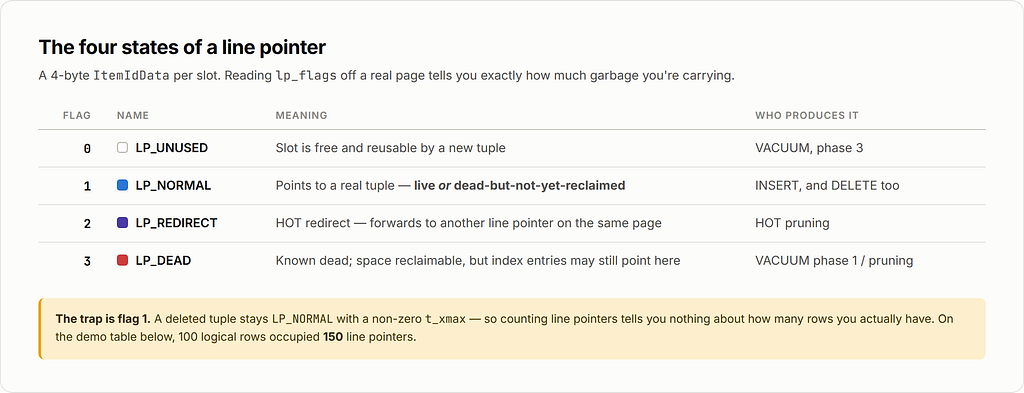
The deleted tuples have t_xmax = 802 (the transaction that deleted them) and are still LP_NORMAL (lp_flags = 1). They occupy real space. The table now has 150 line pointers where the logical row count is 100.
SELECT tuple_count, dead_tuple_count, dead_tuple_percent, free_percent
FROM pgstattuple('demo');
 tuple_count | dead_tuple_count | dead_tuple_percent | free_percent
-------------+------------------+--------------------+--------------
         100 |               50 |              21.36 |        19.09
21% of that table is garbage. And that’s after one round.
Part 2: Anatomy of an 8 KB page
PostgreSQL stores everything in fixed-size blocks — 8 KB by default (SHOW block_size). Understanding the layout of one page is the key to understanding why churn is expensive.
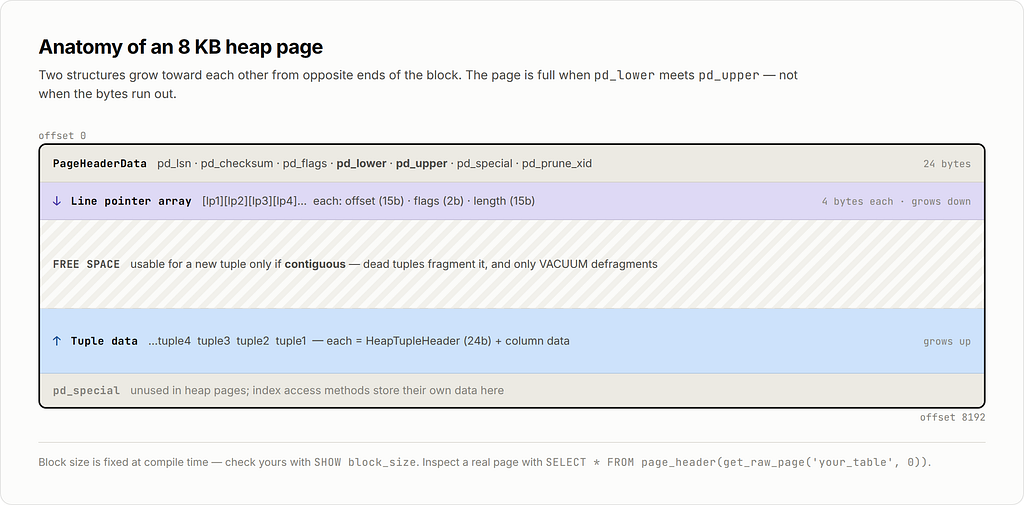
Two structures grow toward each other from opposite ends: the line pointer array from the top, the tuple data from the bottom. The page is full when they meet.
The line pointer (also called an item identifier, ItemIdData) is a tiny 4-byte struct that says “the tuple at slot N lives at byte offset X and is Y bytes long.” It has four possible states, and you’ll see all of them in this article:
The tuple header (HeapTupleHeader, 23 bytes padded to 24) is where MVCC lives:
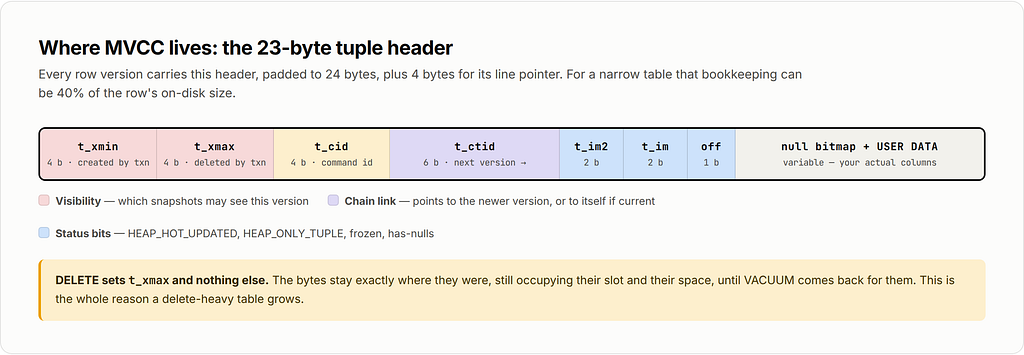
That’s 24 bytes of overhead per row version, plus 4 bytes for the line pointer. For a table storing a user ID, a short state string, and a timestamp, the MVCC bookkeeping can easily be 40% of the row’s on-disk size.
Now here’s the critical bit for our problem:
A page’s free space is only usable for a new tuple if it is contiguous and the page has a free line pointer or room to add one. Dead tuples fragment the page. Only vacuum can defragment it.
Part 3: Why DELETE + INSERT is the worst shape
Compare what the two write patterns do to a page.
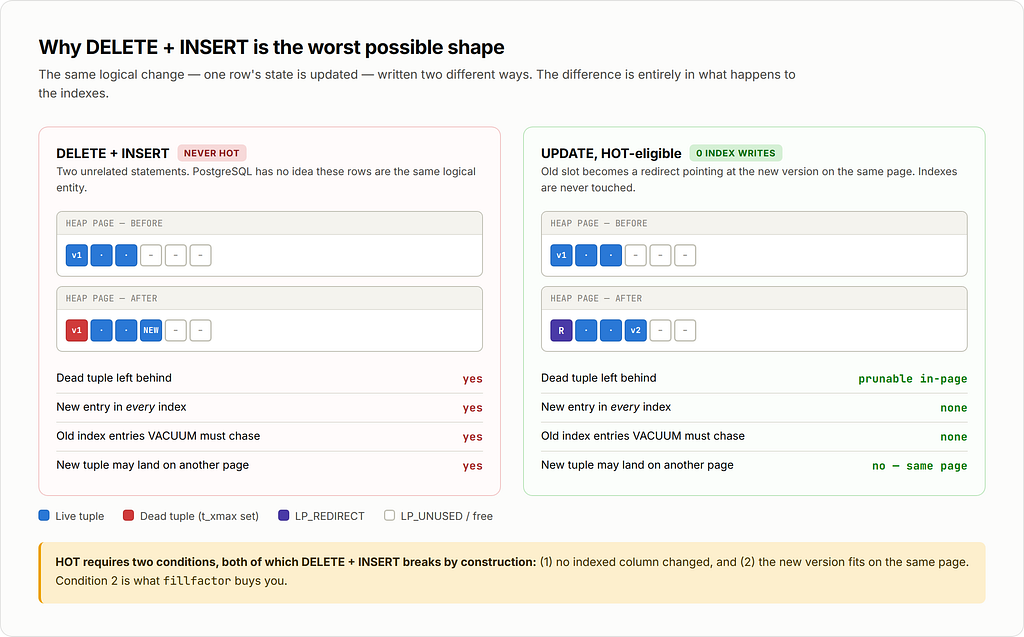
A DELETE + INSERT can never be a HOT update. HOT (Heap-Only Tuple) is an optimization that only applies to UPDATE, and only when two conditions hold:
- No indexed column changed.
- The new version fits on the same page as the old one.
When both hold, PostgreSQL writes the new version onto the same page and links it via t_ctid, leaving the index entries alone. That’s an enormous saving: index maintenance is usually the dominant cost of a write, because B-tree inserts are random-access, and every index on the table pays it.
By splitting your logical update into two statements, you’ve told PostgreSQL: this is a brand-new row that has nothing to do with the old one. It has no choice but to write full index entries into every index, and to leave a dead tuple behind that vacuum must chase down.
You can see HOT working with pageinspect. In a table where updates are HOT-eligible, the page fills up with redirect pointers:
SELECT lp, lp_flags, lp_len, t_ctid
FROM heap_page_items(get_raw_page('user_state_hot', 0)) LIMIT 5;
 lp | lp_flags | lp_len | t_ctid
----+----------+--------+--------
  1 |        2 |      0 |          <- LP_REDIRECT
  2 |        2 |      0 |          <- LP_REDIRECT
  3 |        2 |      0 |          <- LP_REDIRECT
  4 |        2 |      0 |          <- LP_REDIRECT
  5 |        2 |      0 |          <- LP_REDIRECT
Those redirect pointers are the physical trace of updates that cost zero index writes.
Part 4: What vacuum actually does
Vacuum is not one operation. A standard (non-full) VACUUM of a table with indexes runs in phases, and understanding the phases explains where the CPU goes.
Phase 1 — Heap scan
Vacuum scans the table’s pages (skipping ones the visibility map marks all-visible, which is the main reason vacuum on an append-only table is cheap and vacuum on a churned table is not). For each page it:
- Prunes HOT chains and marks reclaimable tuples.
- Collects the TIDs (page number, line pointer) of dead tuples into memory.
- Sets LP_DEAD on their line pointers.
The dead TID list is bounded by maintenance_work_mem (or autovacuum_work_mem). In PostgreSQL 17+ this list is stored in an adaptive radix tree (TidStore) rather than a flat array, which cut memory usage dramatically and removed the old 1 GB cap — a genuinely large improvement for high-churn tables.
Phase 2 — Index vacuum
This is the expensive part. For every index on the table, vacuum performs a full scan (a btbulkdelete) and removes every index entry pointing at a dead TID.
Note what that means: the cost is per index, and it’s a full index scan, not a lookup. A table with five indexes pays five full index scans per vacuum cycle. This is why “just add an index” decisions compound badly on high-churn tables.
Phase 3 — Heap vacuum
Vacuum revisits the pages and turns LP_DEAD line pointers into LP_UNUSED, then defragments the page: it slides the remaining tuples together so the free space becomes one contiguous block. Now that space is genuinely reusable.
If the dead-TID list overflowed maintenance_work_mem in phase 1, vacuum has to loop: scan more heap → vacuum all indexes again → vacuum heap again. A single vacuum of a big churned table can do the full index pass multiple times. This is the classic “why has autovacuum been running for six hours” answer.
Phase 4 — Freezing
Separately, vacuum replaces old xmin values with a frozen marker so transaction IDs can wrap around safely. Anti-wraparound vacuums are non-cancelable and will run whether you like it or not. PostgreSQL 18 added eager freezing (vacuum_max_eager_freeze_failure_rate, default 0.03) so that normal vacuums opportunistically freeze pages, spreading this cost out instead of saving it up for one giant emergency vacuum.
Phase 5 — Truncation
If there are empty pages at the end of the table, vacuum tries to return them to the OS. This requires an ACCESS EXCLUSIVE lock (briefly). Note the word end: vacuum almost never shrinks a bloated table, because the free space is scattered throughout, not conveniently at the tail. It makes the space reusable by PostgreSQL, not available to your filesystem.
Here’s the before/after on our demo table:
VACUUM demo;
SELECT lp_flags, count(*)
FROM heap_page_items(get_raw_page('demo',0)) GROUP BY 1;
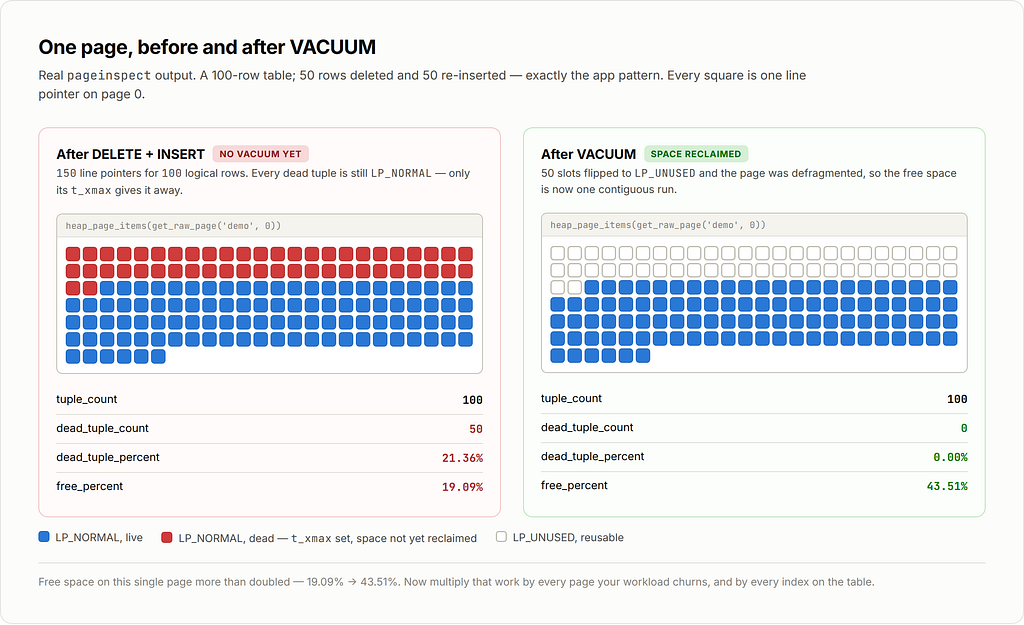
Free space on the page went from 19.09% → 43.51%. That’s the work vacuum did. Now multiply it by every page you churned.
Part 5: The amplification math
Here is the part people underestimate. One logical “user state changed” event does not cause one write. It causes, at minimum:
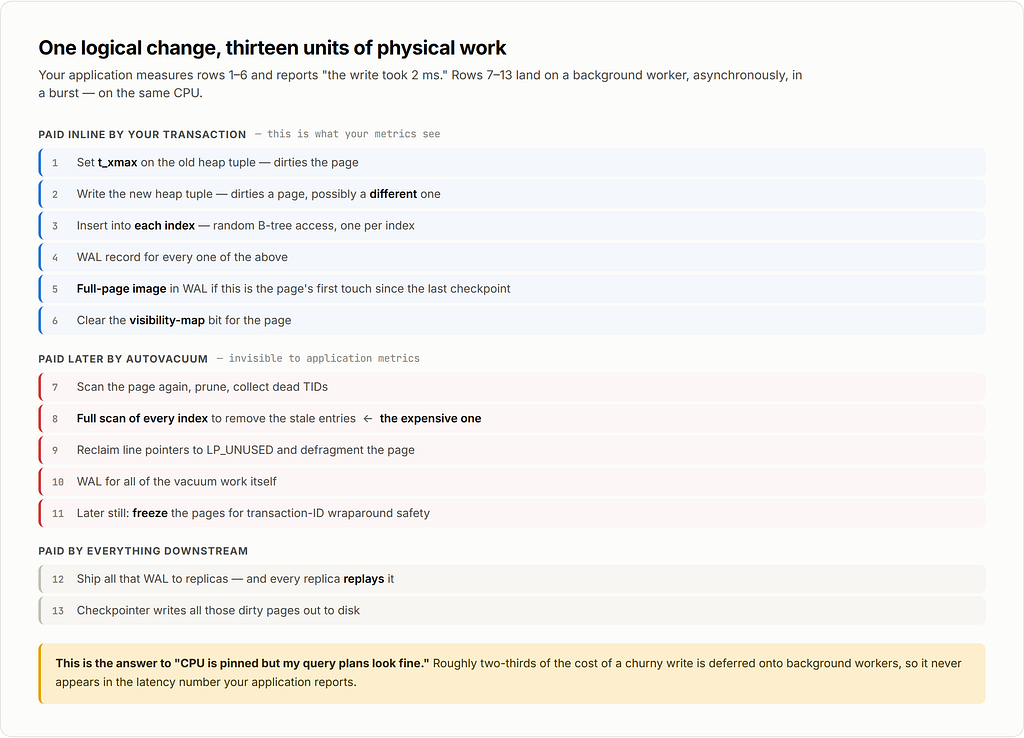
Steps 7–13 are invisible in your application metrics. Your app measures step 1–6 latency and reports “the insert took 2 ms.” The other two-thirds of the cost lands on a background worker, asynchronously, in a burst, on the same CPU.
That’s the answer to “why does CPU go up but my queries look fine.”
Point 5b: the full-page-image trap
After each checkpoint, the first write to any page triggers a full 8 KB page image written into WAL (full_page_writes, on by default, and required for crash safety on most filesystems). If your churn touches many distinct pages, you pay a lot of FPIs. If your churn is concentrated on a few pages, you pay far fewer. Delete+insert scatters writes across pages — the new tuple often lands in a different page from the one you dirtied with the xmax write. Two dirty pages instead of one, two FPI candidates instead of one.
Point 5c: the read-side cost nobody mentions
Dead tuples also make reads slower and CPU-hungrier:
- An index scan follows an index entry to the heap, reads the tuple, checks visibility, discovers it’s dead, and discards it. That’s a wasted buffer access plus a visibility check. You can see this directly: EXPLAIN (ANALYZE, BUFFERS) will show a rising Buffers: shared hit count for a query returning the same number of rows.
- Bloated tables have worse cache locality. The same 100k live rows spread over 2× the pages means 2× the shared buffers to hold them, which evicts other things.
- On a read, PostgreSQL may perform opportunistic HOT pruning on the page — real CPU work done inside your SELECT.
Part 6: Measurements
I ran a controlled comparison: 100,000 rows, ten rounds of modifying 20,000 of them, with an explicit VACUUM after each round so we’re looking at steady state, not a runaway. Three variants:
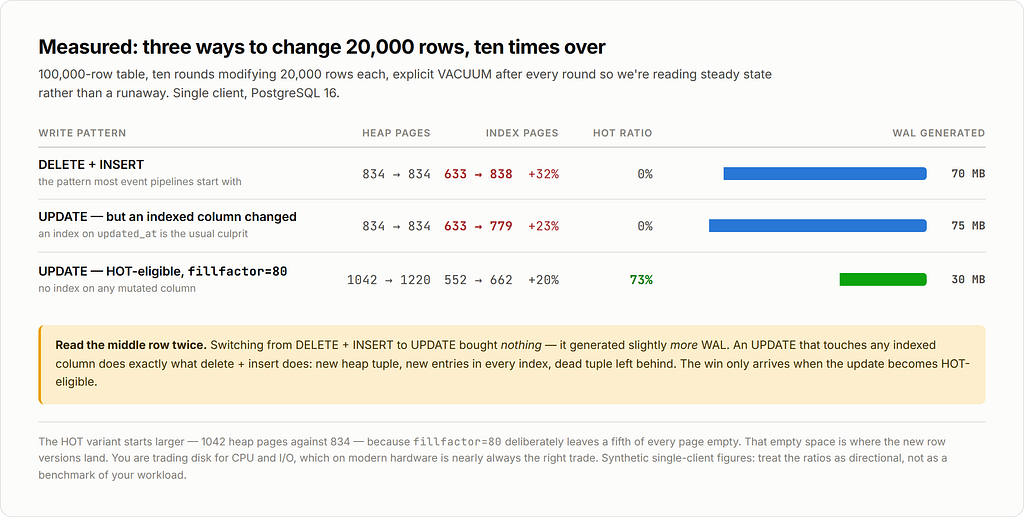
Read those rows carefully, because the middle one is the trap.
Switching from **DELETE+**INSERT to UPDATE bought essentially nothing on its own. The second variant still generated more WAL than the first. Why? Because the UPDATE touched updated_at, and updated_at had an index on it. An UPDATE that modifies any indexed column is not HOT-eligible, so it does exactly what delete+insert does: new heap tuple, new entries in every index, dead tuple left behind.
The third variant — same UPDATE, but with no index on the mutated columns and fillfactor lowered to 80 — generated less than half the WAL and made 73% of its updates HOT.
The cost of that win is visible too: the HOT table starts at 1042 heap pages instead of 834, because fillfactor=80 deliberately leaves 20% of every page empty. That empty space is what new row versions land in. You are trading disk space for CPU and I/O, which on modern hardware is almost always the right trade.
(These are synthetic single-client numbers on PostgreSQL 16 — treat the ratios as directional, not as a benchmark of your workload.)
Part 7: Fixing it, in order of leverage
7.1 Don’t write when nothing changed
The cheapest write is the one that doesn’t happen. A shocking amount of churn in “collect user state” systems is rewriting a row to the exact same value because an event arrived that didn’t actually change anything.
INSERT INTO user_state (user_id, state, score, updated_at)
VALUES ($1, $2, $3, now())
ON CONFLICT (user_id) DO UPDATE
SET state      = EXCLUDED.state,
    score      = EXCLUDED.score,
    updated_at = now()
WHERE user_state.state  IS DISTINCT FROM EXCLUDED.state
   OR user_state.score  IS DISTINCT FROM EXCLUDED.score;
That trailing WHERE on the DO UPDATE clause is the whole trick: if nothing changed, PostgreSQL writes nothing — no new tuple, no dead tuple, no index entry, no WAL. In event-driven systems where the same state gets recomputed repeatedly, this alone often removes 50–90% of write volume.
Measure how much you’d save before you build anything else:
-- how many of your writes are no-ops?
SELECT count(*) FILTER (WHERE state = $2 AND score = $3) AS would_be_noop,
       count(*) AS total
FROM user_state WHERE user_id = ANY($1);
7.2 Make your updates HOT-eligible
Two requirements, both actionable:
(a) Don’t index the columns that change. Audit every index against your write path:
SELECT i.relname AS index_name,
       array_agg(a.attname ORDER BY x.n) AS indexed_columns,
       s.idx_scan AS times_used
FROM pg_index ix
JOIN pg_class i ON i.oid = ix.indexrelid
JOIN pg_class t ON t.oid = ix.indrelid
JOIN LATERAL unnest(ix.indkey) WITH ORDINALITY AS x(attnum, n) ON true
JOIN pg_attribute a ON a.attrelid = t.oid AND a.attnum = x.attnum
LEFT JOIN pg_stat_user_indexes s ON s.indexrelid = i.oid
WHERE t.relname = 'user_state'
GROUP BY i.relname, s.idx_scan
ORDER BY s.idx_scan NULLS FIRST;
An index on updated_at is the single most common HOT-killer in exactly this kind of table. Ask whether you truly need it, or whether a partial index, a coarser index (date_trunc(‘hour’, updated_at) doesn’t help — but a separate low-churn audit table might), or no index at all would do.
Unused indexes are pure loss: they cost writes and vacuum passes and return nothing. Drop them.
(b) Leave room on the page.
ALTER TABLE user_state SET (fillfactor = 80);
-- fillfactor only applies to newly written pages;
-- rewrite the table to apply it to existing data:
VACUUM FULL user_state;   -- takes ACCESS EXCLUSIVE lock
-- or, online:
-- pg_repack -t user_state
For a heavily-updated table, 70–85 is a reasonable range. Below ~70 you’re wasting a lot of buffer cache on empty space.
Then confirm it’s working:
SELECT relname,
       n_tup_upd,
       n_tup_hot_upd,
       round(100.0 * n_tup_hot_upd / NULLIF(n_tup_upd,0), 1) AS hot_pct
FROM pg_stat_user_tables
WHERE relname = 'user_state';
If hot_pct is near zero on an update-heavy table, that is your bug. Aim for 80%+.
7.3 Tune autovacuum for this table, not globally
The defaults are tuned for a small table on a small machine. autovacuum_vacuum_scale_factor = 0.2 means vacuum waits until 20% of the table is dead before acting. On a 500-million-row table that’s 100 million dead tuples before anything happens — and then one enormous, disruptive vacuum.
You want the opposite: vacuum more often, doing less each time.
ALTER TABLE user_state SET (
  autovacuum_vacuum_scale_factor  = 0.01,   -- act at 1% dead, not 20%
  autovacuum_vacuum_threshold     = 1000,
  autovacuum_analyze_scale_factor = 0.02,
  autovacuum_vacuum_cost_delay    = 0,      -- don't throttle this table
  autovacuum_vacuum_cost_limit    = 3000
);
And globally, if your hardware is modern (NVMe, many cores), the shipped throttle is far too conservative:
autovacuum_max_workers      = 6          # default 3
autovacuum_naptime          = 15s        # default 1min
autovacuum_vacuum_cost_delay = 2ms       # default 2ms; consider 0 on fast storage
vacuum_cost_limit           = 2000       # default 200
maintenance_work_mem        = 2GB        # gives vacuum a big dead-TID store
autovacuum_work_mem         = 1GB
The cost-delay mechanism is the one most often left at a value that makes vacuum unable to keep up: vacuum accumulates “cost” (1 per buffer hit, 2 per miss, 20 per dirtied page) and sleeps cost_delay whenever it exceeds cost_limit. With the defaults, vacuum is deliberately slowed to something like a few MB/s. On a table generating hundreds of MB of dead tuples per minute, it will never catch up, and dead tuples accumulate forever.
PostgreSQL 18 also added autovacuum_vacuum_max_threshold (default 100,000,000), which caps the scale-factor calculation so very large tables can’t defer vacuum indefinitely. It helps, but a per-table scale factor is still better.
7.4 Reconsider the data model
If your state genuinely is “replace the whole thing on every event,” ask whether it belongs in a row-per-user table at all:
- Collapse many rows into one. If you’re storing N state rows per user and replacing them all, one row with a jsonb column can turn N deletes + N inserts into one update — and if jsonb is under the TOAST threshold and no indexed column changes, that update can be HOT. (Careful: a large jsonb that gets TOASTed is a whole separate write amplification problem. This works when the document is small, roughly under 2 KB.)
- Append-only + a materialized “current” view. Write events to a partitioned append-only table (no updates, no deletes, so almost no vacuum work — just insert-triggered vacuums for freezing), and maintain the current state separately, or compute it with a DISTINCT ON query over a well-indexed event log. Append-only tables are the cheapest thing PostgreSQL does.
- Move the hottest state out of PostgreSQL. If a piece of state changes many times per second per user and you only ever need the latest value, Redis or a dedicated KV store is the honest answer. Not everything needs to be transactional and durable.
Part 8: The hard question — updating billions of rows
This is the case where all the usual advice breaks, so it deserves its own treatment.
Why the naive approach fails, precisely
UPDATE huge_table SET status = 'migrated' WHERE status = 'pending';
-- 2,000,000,000 rows
Four separate disasters:
1. Table size doubles. Every updated row writes a new version while the old one stays. A 2 TB table becomes 4 TB mid-statement. Then vacuum makes the space reusable but does not return it to the OS. You now permanently need 4 TB of disk for 2 TB of data.
2. It generates terabytes of WAL in one burst. Replicas fall behind, archiving falls behind, and if you’re on a cloud provider you may fill the WAL volume and take the primary down.
3. It holds a single transaction open for hours — and this is the one that hurts most. Vacuum can only remove tuples older than the oldest running transaction’s snapshot (the xmin horizon). A long transaction pins that horizon. So while your giant UPDATE runs, vacuum cannot clean up dead tuples anywhere in the entire database — not just this table. Every other table quietly bloats. This is how one migration takes down a whole cluster.
4. If it fails at 95%, all the work is thrown away — but the dead tuples it created are not. You get the bloat with none of the benefit.
You can watch the horizon problem happen:
SELECT pid, age(backend_xid) AS xid_age, state,
       now() - xact_start AS duration, left(query, 60)
FROM pg_stat_activity
WHERE backend_xid IS NOT NULL
ORDER BY xact_start
LIMIT 5;
Also check for the other two horizon-pinners people forget: replication slots and prepared transactions.
SELECT slot_name, active, age(xmin) AS xmin_age,
       pg_size_pretty(pg_wal_lsn_diff(pg_current_wal_lsn(), restart_lsn)) AS retained_wal
FROM pg_replication_slots;
SELECT gid, prepared, age(transaction) FROM pg_prepared_xacts;
An inactive replication slot will pin the xmin horizon forever and no amount of vacuum tuning will save you.
Strategy A: Batched backfill with keyset pagination
The workhorse. Small transactions, each one committing so the xmin horizon advances and vacuum can keep pace.
-- Track progress in a real table so the job is resumable
CREATE TABLE IF NOT EXISTS backfill_progress (
  job_name text PRIMARY KEY,
  last_id  bigint NOT NULL,
  updated_at timestamptz NOT NULL DEFAULT now()
);
-- One batch. Run this in a loop from your application or a scheduler.
WITH bounds AS (
  SELECT last_id FROM backfill_progress WHERE job_name = 'status_migration'
),
batch AS (
  SELECT id FROM huge_table
  WHERE id > (SELECT last_id FROM bounds)
  ORDER BY id
  LIMIT 5000
  FOR UPDATE SKIP LOCKED
),
upd AS (
  UPDATE huge_table t
  SET status = 'migrated'
  FROM batch b
  WHERE t.id = b.id
    AND t.status IS DISTINCT FROM 'migrated'   -- skip no-op writes
  RETURNING t.id
)
UPDATE backfill_progress
SET last_id = COALESCE((SELECT max(id) FROM batch), last_id),
    updated_at = now()
WHERE job_name = 'status_migration'
RETURNING last_id, (SELECT count(*) FROM upd) AS rows_updated;
Rules that make the difference between this working and this being a slow disaster:
- Keyset pagination, never OFFSET. OFFSET 10000000 re-scans ten million rows every batch. WHERE id > $last uses the index.
- Batch size 1,000–10,000 rows. Big enough to amortize overhead, small enough that each transaction finishes in well under a second.
- AND col IS DISTINCT FROM $new so re-running a batch is free and no-ops don’t write.
- Throttle deliberately. Sleep 50–200 ms between batches. You are racing autovacuum; give it room to win. Adaptive throttling — sleep longer when replication lag or dead-tuple count rises — is worth the extra code:
-- feed this into your loop's sleep decision
SELECT (SELECT n_dead_tup FROM pg_stat_user_tables WHERE relname='huge_table') AS dead,
       (SELECT coalesce(max(pg_wal_lsn_diff(sent_lsn, replay_lsn)), 0)
        FROM pg_stat_replication) AS replica_lag_bytes;
- Run it during a low-traffic window if you have one, but design it to be safe at any time.
Expected duration is the thing to be honest about: 2 billion rows at 5,000 rows/batch with a 100 ms sleep is 400,000 batches ≈ 11+ hours minimum, realistically a few days. That’s fine. Plan for days, make it resumable, make it observable.
Strategy B: Partitioning + partition swap
If your data is naturally partitionable (by time, tenant, hash of user ID), this changes the game completely, because you can rebuild a partition offline and swap it in atomically.
-- Assume: huge_table PARTITION BY RANGE (created_at)
--         with partition huge_table_2026_03
-- 1. Build the new version at full speed, outside the live table.
CREATE TABLE huge_table_2026_03_new (LIKE huge_table INCLUDING ALL);
INSERT INTO huge_table_2026_03_new
SELECT id, user_id, 'migrated'::text AS status, payload, created_at
FROM huge_table_2026_03;
-- 2. Indexes AFTER the load - far faster than maintaining them during it.
--    No CONCURRENTLY needed: nothing is reading this table yet.
CREATE INDEX ON huge_table_2026_03_new (user_id);
ANALYZE huge_table_2026_03_new;
-- 3. Atomic swap: milliseconds of ACCESS EXCLUSIVE lock, not hours.
BEGIN;
  ALTER TABLE huge_table DETACH PARTITION huge_table_2026_03;
  ALTER TABLE huge_table ATTACH PARTITION huge_table_2026_03_new
    FOR VALUES FROM ('2026-03-01') TO ('2026-04-01');
COMMIT;
-- 4. Keep the old one around until you're confident, then drop it.
-- DROP TABLE huge_table_2026_03;
Why this is so much better:
- The bulk INSERT into an empty, unindexed table is the fastest write path PostgreSQL has. No dead tuples are created at all.
- Zero vacuum debt: you never made garbage, so there’s nothing to collect.
- The lock window is milliseconds.
- Rollback is trivial: swap the old partition back.
- You can do partitions one at a time, over weeks, with a rollback point after each.
There’s a caveat worth knowing: ATTACH PARTITION validates that existing rows satisfy the partition constraint, which requires a scan — unless you add a matching CHECK constraint to the new table first, in which case PostgreSQL skips the scan.
ALTER TABLE huge_table_2026_03_new
  ADD CONSTRAINT part_check
  CHECK (created_at >= '2026-03-01' AND created_at < '2026-04-01') NOT VALID;
ALTER TABLE huge_table_2026_03_new VALIDATE CONSTRAINT part_check;
-- now ATTACH is instant
If you have billions of rows and no partitioning, partitioning is probably the actual project — not the update itself. Everything downstream gets easier: DROP PARTITION replaces mass DELETE (instant, and creates zero dead tuples), vacuum works per-partition in parallel, and index sizes stay manageable.
Strategy C: Rebuild and swap the whole table
When the change is uniform and you can’t partition, build a new table and cut over.
For a bloated table with no schema change, pg_repack does this online: it builds a fresh copy, captures concurrent changes via triggers, replays them, and swaps — taking the exclusive lock only for the final instant.
pg_repack -h host -d mydb -t huge_table --jobs 4
For a schema/data change, the same idea by hand with logical replication or triggers; tools like pgroll and Percona’s approach automate it. The pattern is always: new table, bulk load, keep in sync, atomic rename.
Budget for double the disk space. That’s the price of every swap-based strategy.
Strategy D: Don’t update at all
The strategy people skip past. Ask whether the update is necessary:
- Add a new column with a default instead of rewriting values — since PostgreSQL 11, adding a column with a non-volatile default is a metadata-only change that rewrites nothing, no matter how big the table.
- Write a view that computes the new value from the old one, and migrate readers to it.
- Use a generated column if the new value is derivable.
- Let it happen lazily: update rows as they’re naturally touched by the application, with a background job mopping up the long tail over months.
A billion-row update you don’t have to run is strictly better than one you run well.
Part 9: What to actually watch
Four queries. Put them on a dashboard.
1. Is vacuum keeping up?
SELECT relname,
       n_live_tup,
       n_dead_tup,
       round(100.0 * n_dead_tup / NULLIF(n_live_tup + n_dead_tup, 0), 2) AS dead_pct,
       last_autovacuum,
       autovacuum_count,
       n_tup_upd,
       n_tup_hot_upd,
       round(100.0 * n_tup_hot_upd / NULLIF(n_tup_upd, 0), 1) AS hot_pct
FROM pg_stat_user_tables
WHERE n_dead_tup > 10000
ORDER BY n_dead_tup DESC
LIMIT 20;
Sustained dead_pct above ~10% on a busy table means vacuum is losing. hot_pct near zero on an update-heavy table means you’re paying full index cost on every write.
2. What is vacuum doing right now?
SELECT p.pid, p.relid::regclass AS table, p.phase,
       pg_size_pretty(p.heap_blks_total * 8192::bigint) AS total,
       round(100.0 * p.heap_blks_scanned / NULLIF(p.heap_blks_total,0), 1) AS pct_scanned,
       p.index_vacuum_count,
       now() - a.xact_start AS running_for
FROM pg_stat_progress_vacuum p
JOIN pg_stat_activity a USING (pid);
index_vacuum_count > 1 is the smoking gun for maintenance_work_mem being too small — vacuum had to do the index pass more than once.
3. Is anything pinning the xmin horizon?
SELECT 'backend' AS src, pid::text AS id, age(backend_xmin) AS xmin_age
FROM pg_stat_activity WHERE backend_xmin IS NOT NULL
UNION ALL
SELECT 'slot', slot_name, age(xmin) FROM pg_replication_slots WHERE xmin IS NOT NULL
UNION ALL
SELECT 'prepared_xact', gid, age(transaction) FROM pg_prepared_xacts
ORDER BY xmin_age DESC NULLS LAST
LIMIT 10;
Anything with a large age here is preventing vacuum from cleaning up database-wide.
4. How bloated is it, really?
CREATE EXTENSION IF NOT EXISTS pgstattuple;
-- accurate but does a full scan; use the sampling version on huge tables
SELECT * FROM pgstattuple('user_state');
SELECT * FROM pgstattuple_approx('huge_table');
SELECT * FROM pgstatindex('user_state_user_id_idx');
For indexes, avg_leaf_density below ~50 means the index is worth rebuilding:
REINDEX INDEX CONCURRENTLY user_state_user_id_idx;
The checklist
If you’re in the situation this article opened with, do these in order:
- Measure first. dead_pct, hot_pct, pg_stat_progress_vacuum, xmin horizon. Don’t tune blind.
- Kill no-op writes with ON CONFLICT DO UPDATE … WHERE … IS DISTINCT FROM. Usually the biggest single win, and the cheapest to ship.
- Convert delete+insert to UPDATE — but only after step 4, or it buys you nothing.
- Make updates HOT-eligible. Drop or move indexes on frequently-changed columns (especially updated_at). Set fillfactor to 80. Verify hot_pct climbs above 80%.
- Tune autovacuum per-table: scale factor down to 0.01, cost delay to 0, cost limit way up, maintenance_work_mem to gigabytes.
- Drop unused indexes. Every one is a write tax and an extra full scan per vacuum.
- Partition if the table is large and the data has a natural key. This makes every future problem easier.
- For mass updates: batched keyset backfill, or partition rebuild-and-swap. Never one giant statement.
The underlying idea is simple enough to hold in your head: PostgreSQL is a copy-on-write storage engine that trades write amplification for concurrency. Delete+insert opts into the maximum possible amplification — no HOT, full index maintenance, guaranteed dead tuples, guaranteed vacuum work. Understanding what happens on the 8 KB page is what turns “the database is slow” into a list of specific, fixable things.
If this was useful, the two commands worth internalizing are pageinspect’s heap_page_items() and pgstattuple(). Point them at your hottest table. What you find will probably explain your CPU graph.
References
- PostgreSQL 18: Routine Vacuuming
- PostgreSQL 18: Vacuuming configuration parameters
- PostgreSQL 18 Released
- PostgreSQL 18 Vacuuming Improvements Explained (Microsoft)
- autovacuum_vacuum_max_threshold in PostgreSQL 18 (dbi services)
- Faster VACUUM with Adaptive Radix Trees in PostgreSQL 17 (pganalyze)
- VACUUM at the Page Level (boringSQL)